In short
- llm-d 1.0 ships every well-lit path as a recipe. llmdup runs those recipes for you, instead of you copying commands out of a README.
llmdup local up --yesbrings up the llm-d router, the Inference Extension and two simulated model servers on a laptop in about two minutes, with no GPU.- The same plan runs on your cluster, from a k9s-style UI, a JSON CLI, or an MCP server that agents can use safely.
Why it exists
llm-d is a Kubernetes-native way to serve LLMs, with prefix-cache aware routing, prefill/decode disaggregation and latency-based routing. The hard part is the first hour: clone the right release, read a support table, export a dozen variables, copy the blocks that apply, and hope the cleanup was complete.
llm-d 1.0 made that machine-readable: each guide is a guide.yaml with variables, a support matrix and ordered prerequisite, deploy, verify and cleanup steps. llmdup drives that recipe. It writes no install commands of its own, so what it runs is exactly what llm-d’s own guides say.
| By hand | llmdup | |
|---|---|---|
| Variables | Read the support table, export a dozen | Detects accelerator, provider and model; validates every value |
| Cluster-wide changes | Easy to miss | Flagged, shown with real values, run only after you confirm |
| Knowing it worked | Watch pods, craft a curl | Waits for ready pods, sends the guide’s own smoke test |
| Teardown | Find the cleanup block, hope | Runs the guide’s cleanup, then checks nothing is left |
Try it in two minutes, no GPU
uv tool install llmdup        # or: pip install llmdup
llmdup local up --yes         # kind + llm-d router + simulated models
llmdup status                 # pods and the endpoint
llmdup test                   # rerun the guide's smoke test
llmdup down --yes             # cleanup, then check nothing is left
llmdup local down --yes       # delete the kind cluster
That is a real llm-d stack on a laptop kind cluster: the router, the Gateway API Inference Extension and two simulated model servers, answering /v1/completions through the router. You need Python 3.14 (uv installs it), kubectl, helm and kind with Docker or Podman.
Then run the same plan on your cluster
# preflight: tools, GPUs, CRDs, capacity, HF_TOKEN
llmdup doctor optimized-baseline --context my-cluster

# the ordered steps, cluster-wide ones flagged
llmdup plan optimized-baseline --accelerator gpu

# print the exact script, then run it: deploy, wait for pods, smoke test
llmdup up optimized-baseline --context my-cluster --dry-run
llmdup up optimized-baseline --context my-cluster --yes

llmdup down --context my-cluster --namespace llm-d-optimized-baseline --yes
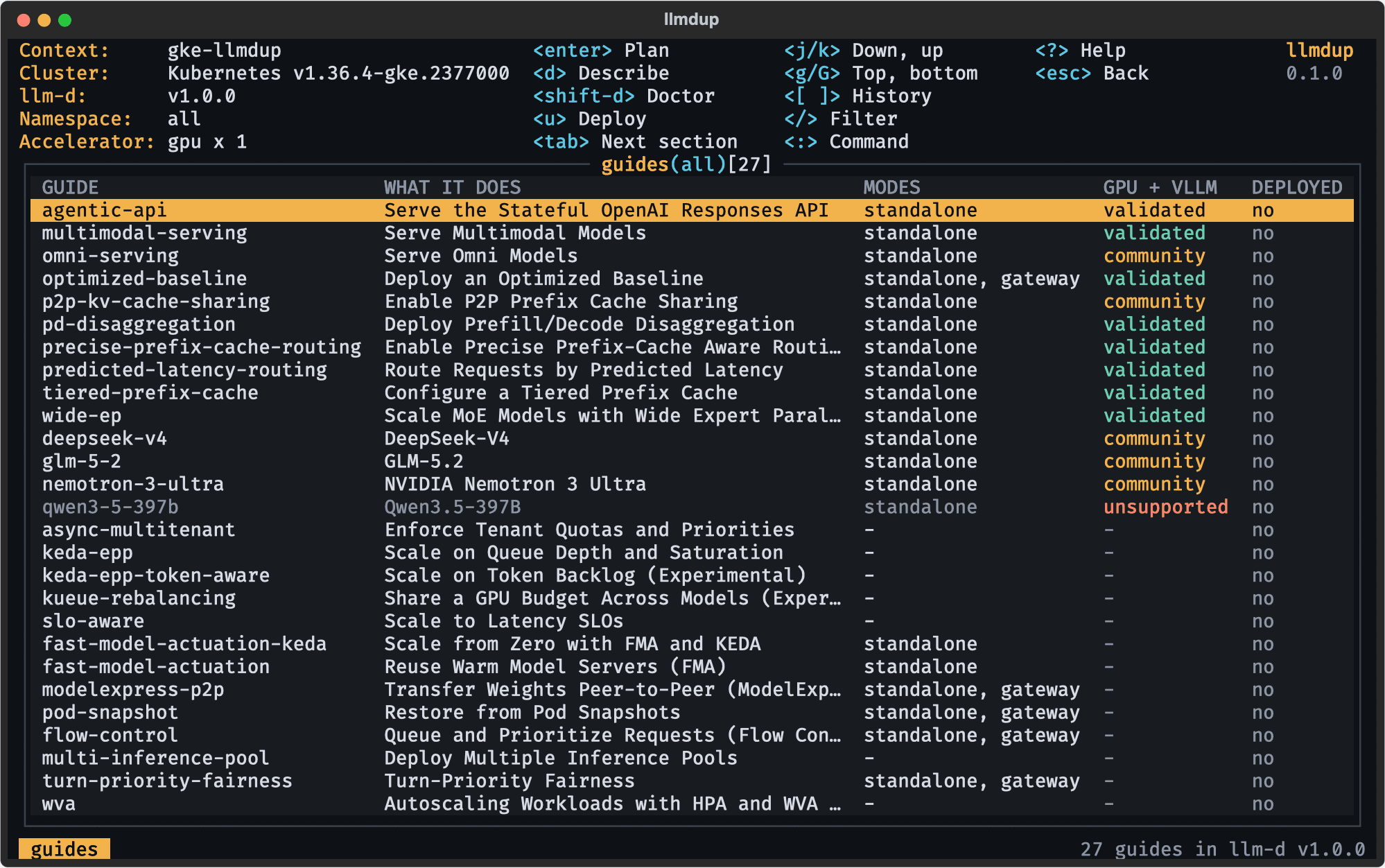
Anything you leave out comes from detection first, then from the guide’s defaults. A value the guide does not allow exits with code 2 and lists the allowed ones. All 27 guides in llm-d v1.0.0 that have a guide.yaml load and plan for up, test and down.
One core, three front ends
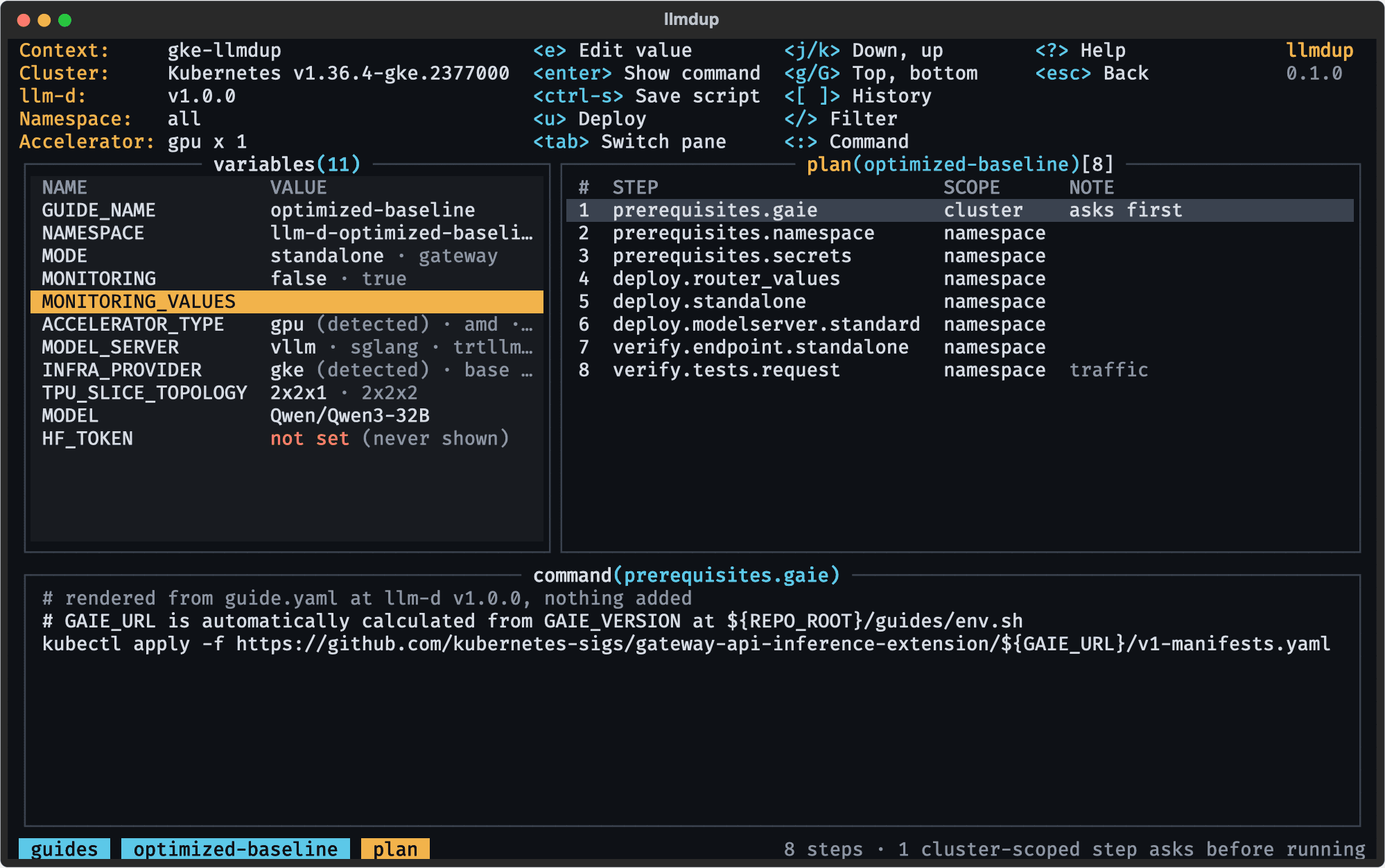
- Terminal UI for people. Run
llmdupwith no arguments. k9s keys; plan, deploy with a live log, doctor with copyable fixes, and stacks where you can test, tail logs, read metrics, port-forward or tear down. - CLI for scripts. With
--yesand--json, every command prints exactly one JSON document and returns a stable exit code: 1 names the failed step and its last 40 log lines, 2 is a bad value, 3 a blocking preflight check, 4 a confirmation that is needed. - MCP server for agents.
claude mcp add llmdup -- llmdup mcpgives an agent eight tools, fromlist_guidestodown.upanddownare two-step: withoutconfirm: truethey change nothing and return the plan, the target context and the exact commands, and the confirmed call must name that same context.
Safe by construction
- The kube context is resolved once and pinned for every command, so switching context in another terminal cannot redirect a deploy.
- Cluster-scoped steps and every delete need explicit confirmation that shows the real context, namespace and commands.
HF_TOKENand other secrets come only from the environment and are redacted from logs, JSON, state and the screen.- Teardown verifies the namespace, Helm releases and pods afterwards. Anything it cannot verify counts as left behind.
Why it matters
- Trying llm-d costs two minutes on a laptop instead of a GPU budget, so a team can learn the router and the Inference Extension before it buys capacity.
- The plan you tried locally is the plan you deploy, so there is no gap between the demo and the cluster.
- Verified teardown means a forgotten experiment does not keep holding GPUs.
- Agents can stand up and tear down inference, with a person approving every cluster-wide change.
Not in 0.1: creating cloud clusters, choosing a configuration from a workload or SLA, benchmarks, several guides in one namespace, and upgrades between llm-d versions.
Try it, and tell me what breaks
uv tool install llmdup
llmdup local up --yes
The code is on GitHub under Apache-2.0, like llm-d, and the package is on PyPI. If you run it on a cluster, open an issue with your accelerator, provider and the guide you tried, whether it worked or not. That is the fastest way to make the next release better.